ZeroBytes POS · for restaurants in Bangladesh

Every order, ticket and taka on one screen. Even offline.

Take orders, print kitchen tickets, split a bill between bKash and cash, and see what sold today. In Bangla or English, on the Windows computer at your counter.

  • Keeps billing when the internet drops
  • বাংলা and English
  • Set up with your menu
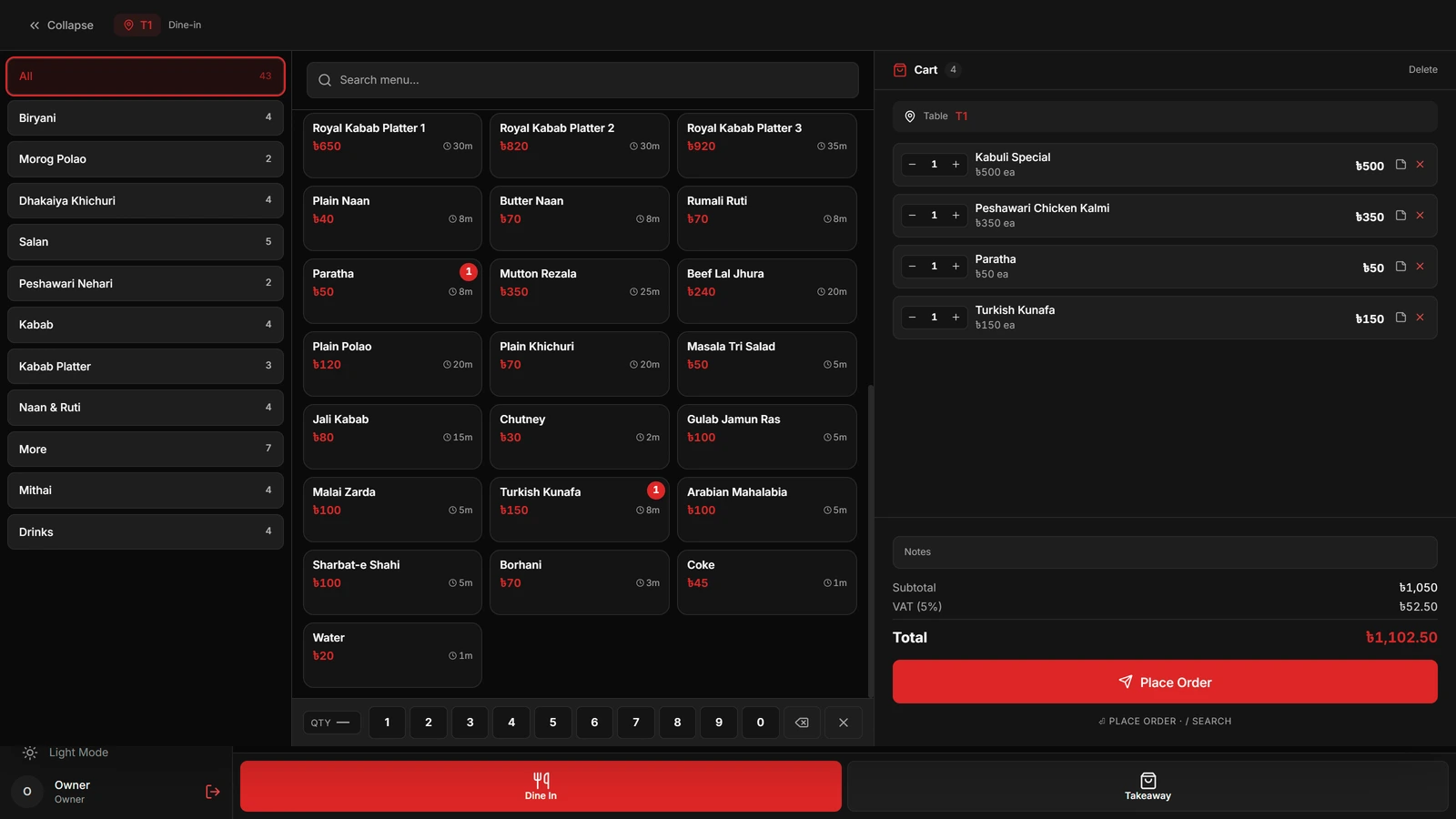
The ZeroBytes POS order screen: menu categories, dishes with prices, and a cart for table 1 with VAT and the total
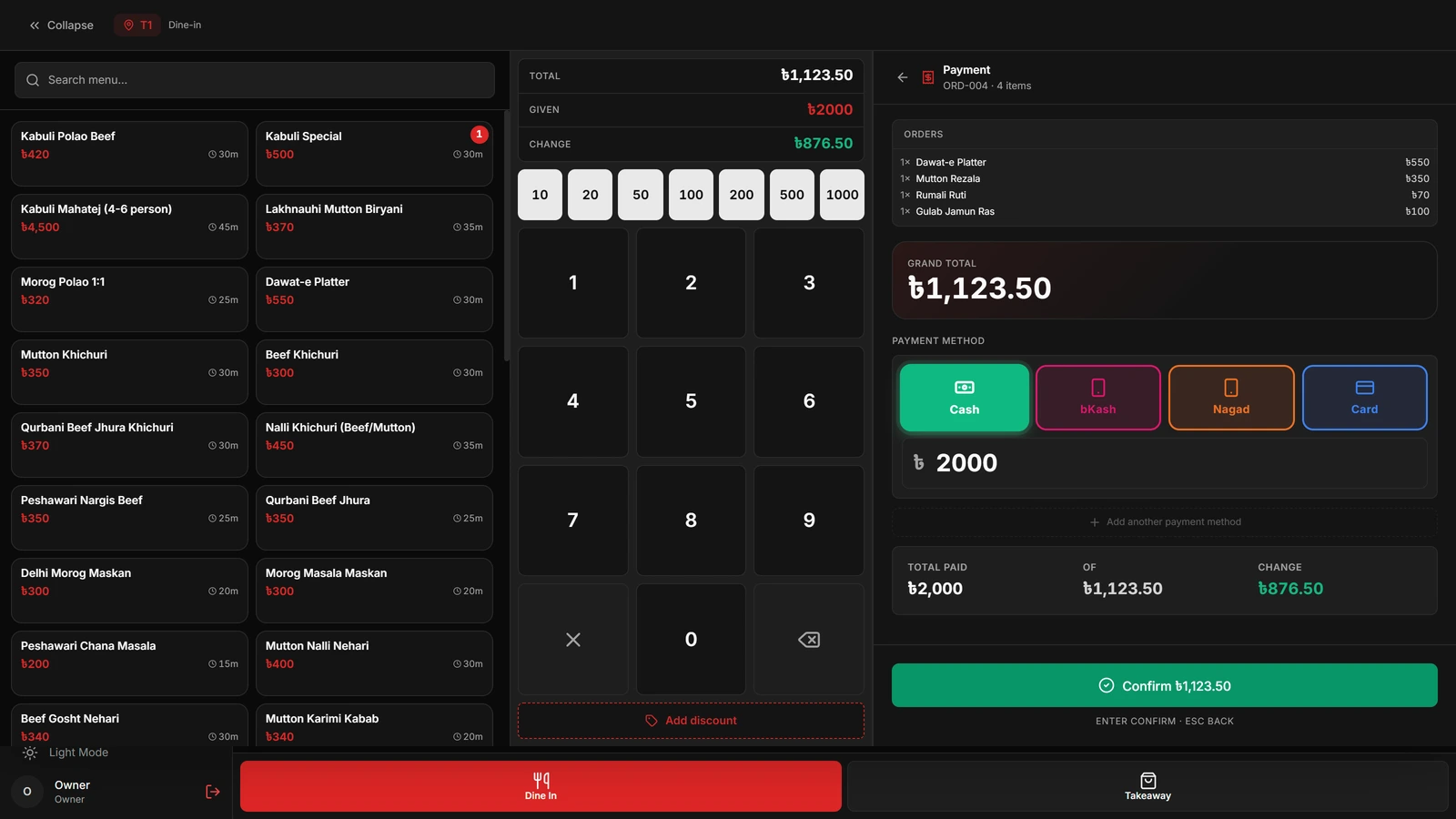
The payment screen for the same kind of bill: ৳1,123.50 due, ৳2,000 given in cash, ৳876.50 change
Real screens from ZeroBytes POS
Taking orders

Tap the dish. The bill adds itself up.

Categories down the side, every dish with its price and cooking time, the order on the right. Quantities come from the number pad and VAT is worked out as you go, so the cashier never reaches for a calculator.

  • Dine-in and takeaway
  • Search the menu by name
  • A note for the kitchen, like “less spicy”
  • Add dishes to an order that is already open
Taking an order
Order screen with menu categories, dish cards and a cart showing subtotal, 5% VAT and total
Bills and payments

Half in bKash, half in cash. One bill.

Guests pay how they like. Record cash, bKash, Nagad or card on the same bill, tap a note for quick cash and the change due shows in green. Card payments keep the bank from a list of Bangladeshi banks.

  • Split one bill across payment methods
  • Quick cash buttons and change due
  • Discounts at the till
  • Void a bill and keep it on record
  • Reprint any receipt
Taking a payment
Payment screen with a ৳1,123.50 total, ৳2,000 given, ৳876.50 change and buttons for cash, bKash, Nagad and card
Tables and reservations

See the whole floor before guests reach the door.

Every table by section, with its seats and a colour for free, occupied, reserved or needs attention. Tap a table to open its order. Phone bookings keep the guest’s name, number, party size and time, and hold the tables for them.

  • Sections and seat counts
  • Status at a glance
  • Reservations with one or more tables
  • Confirmed, seated, completed or no-show
The floor
Tables screen showing eight tables with seat counts, coloured as available or occupied
Kitchen and service

The kitchen knows. The counter knows.

Placing an order prints a ticket in the kitchen with the table, dishes, quantities and notes. Add a naan later and only the naan goes to the kitchen. The counter sees every order move from preparing to ready to served, and which tables still owe.

  • Printed kitchen tickets
  • A separate ticket for added dishes
  • Preparing, ready and served
  • Served but not yet paid, in one list
Order progress
Orders screen listing served orders awaiting payment, with table, items, staff, age and total
Sales reports

Know how the day went before you lock up.

Orders, revenue, the average bill and VAT collected, then how much came in by cash and by bKash, your busiest hours and what sold best. Pick today, the last seven days, this month or any dates, and download it as a spreadsheet.

  • Sales by payment method
  • Orders by hour
  • Best-selling dishes
  • Voided bills and offer results
  • CSV download for your accountant
Today’s report
Reports screen with total orders, revenue, average order, tax collected, payment methods, hourly orders and top-selling items
Menu and offers

Your whole menu, in both languages.

Each dish keeps an English and a Bangla name, a photo, a cooking time and a price for every size: a single plate and a family pack, side by side. Sold out of beef tehari? Switch it off. Offers apply themselves at the till once you set the rules.

  • Sizes, each with its own price
  • Sold-out switch
  • Percentage, fixed and special-price offers
  • Buy one, get one
  • Offers by dish, category and date
The menu
Menu screen with category filters and dish cards showing English and Bangla names, prices and cooking times
Made for Bangladesh

Your team can work in Bangla.

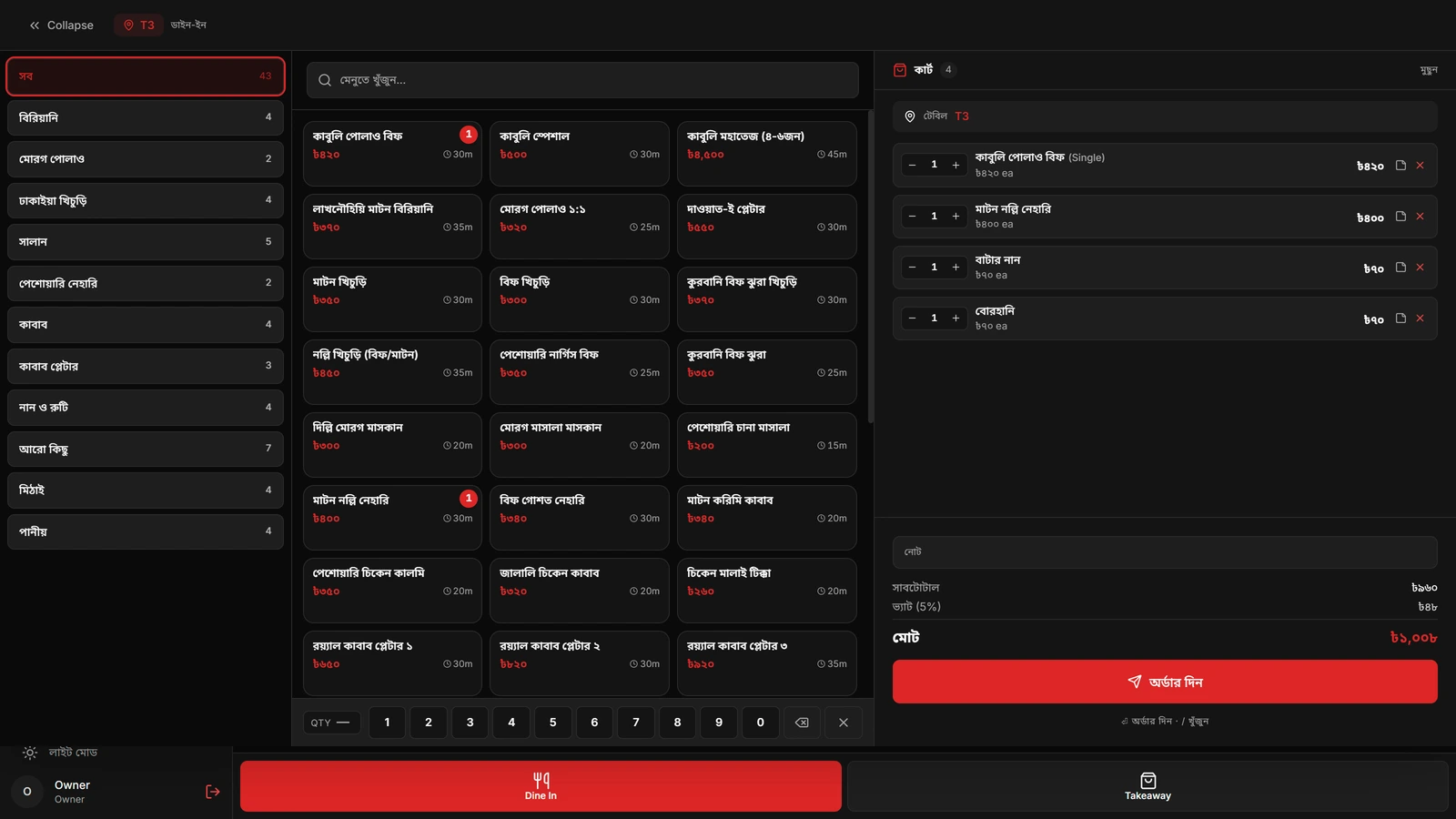
One tap switches the whole till between English and Bangla: the menu, the buttons and the bill. Prices stay in taka, VAT follows Bangladeshi rates and the receipt fits your thermal printer.

  • VAT presets of 5, 7.5, 10 and 15%
  • Supplementary duty where it applies
  • Receipts for 58mm and 80mm paper
The same order screen in Bangla
When the internet drops

The counter doesn’t notice.

ZeroBytes POS keeps its own copy of the restaurant on the computer at the counter. Orders, tickets and bills carry on without a connection, and everything is sent to the cloud the moment it comes back.

  1. The connection goes

    A yellow line at the top says you are offline and counts the changes waiting to be sent.

  2. Service carries on

    Take orders, print kitchen tickets, take payments and print receipts as usual.

  3. It catches up

    When the internet returns, the waiting changes sync and your cloud backup is up to date.

Sync and settings
Settings screen showing the language choice, cloud backup switched on, offline status with 12 changes pending, and VAT settings

How the offline sync works

Everything in the box

The full list, so nothing is a surprise.

Front of house

  • Dine-in and takeaway orders
  • Tables by section with seat counts
  • Reservations and no-shows
  • Pay-first mode for counter service
  • Order notes for the kitchen

Kitchen

  • Printed kitchen tickets
  • Add-on tickets for extra dishes
  • Preparing, ready and served
  • Cooking time on every dish

Money

  • Cash, bKash, Nagad and card
  • One bill across several methods
  • Quick cash and change due
  • Discounts and voided bills
  • VAT presets and supplementary duty

Menu

  • English and Bangla dish names
  • Photos and categories
  • Sizes with their own prices
  • Sold-out switch
  • Separate prices for delivery apps

Offers

  • Percentage and fixed discounts
  • Special prices
  • Buy one, get one
  • Rules by dish, category and date
  • A report on how each offer did

Delivery

  • Foodpanda and Foodie orders entered at the till
  • Each app’s own menu prices
  • Commission worked out per app
  • Delivery kept apart from dine-in sales

Your team

  • A login for each person
  • Owner, manager, cashier and waiter roles
  • Your own custom roles
  • Open and close each day’s session

Reports

  • Daily summary
  • Sales by dish and by hour
  • Payment method split
  • Search past sales
  • CSV download

Setup

  • Windows 10 or 11
  • USB or network thermal printers
  • More than one counter, kept in sync
  • Cloud backup
  • Light and dark themes, six colours
Getting started

From your menu to your first bill.

  1. 1

    Send us your menu

    A photo of the menu card, your tables and how many counters you have, on WhatsApp.

  2. 2

    We set it up

    Dishes, sizes, prices, VAT, staff logins and your printers, ready before we arrive.

  3. 3

    Install and train

    We install it on your Windows computer, connect the printer and walk your team through a shift.

  4. 4

    Open for service

    You start billing. Then 60 days of free fixes and help if anything needs changing.

Questions

What owners ask us first.

Can we keep taking orders when the internet goes down?

Yes. Orders, kitchen tickets and bills are saved on the computer at the counter, so service carries on. When the connection returns, the waiting changes are sent and your backup catches up. With more than one counter, each sees the others’ new orders once it is back online.

What computer and printers do we need?

A Windows 10 or 11 computer with at least 4 GB of memory, and a thermal printer that takes 58mm or 80mm paper, connected by USB or over the network. Send us your models and we will check them before we install.

Can our staff use it in Bangla?

Yes. Anyone can switch the whole interface between English and Bangla, and dishes keep a name in both languages.

How do bKash, Nagad and card payments work?

Guests pay through your own bKash, Nagad or card machine as they do today. The cashier records the method and amount in the POS, and one bill can be split across several methods. The POS keeps the record; it does not move the money itself.

Do Foodpanda and Foodie orders come in automatically?

No, they are entered at the till. Choose the app and the order uses that app’s menu prices and works out its commission, so delivery sales stay separate from dine-in.

Can we use more than one counter?

Yes. Several counters can run for the same restaurant and stay in sync through the cloud. Each one keeps working on its own if the internet drops.

How much does it cost?

It depends on how many counters and printers you have and the help you want. Send us your menu and setup on WhatsApp and we will give you a written price. Every setup includes 60 days of free fixes.

See it running with your own menu.

Send us a few dishes and how your restaurant works. We will show you ZeroBytes POS and tell you exactly what it would take at your counter.