
In this guide
Ask a point of sale vendor whether their software works offline and the answer is always yes. It is a cheap thing to say, because there are at least three different things it can mean, and only one of them is any use in a restaurant on a Friday night.
It can mean the screen stays up and the buttons still move, while every order goes into a queue that will be tried again later, and quietly loses the ones that fail. It can mean the app caches what it last saw, so you can read the menu but not sell from it. Or it can mean the machine in front of the cashier is genuinely in charge, and the server is a copy.
Ours is the third. This is what that took.
The local database is the real one
The terminal runs a full database of its own, SQLite, on the machine, in write ahead logging mode. Not a cache of the server's data. The actual records: the menu, the floor plan, the open orders, the bills, the day's takings.
When a cashier adds an item to an order, that is one transaction against that local database, and the screen updates the moment it commits. There is no network request anywhere in that path. Nothing is waiting on a reply, so there is nothing for a dead line to interrupt.
This is the part that decides everything else. A system that writes to a server first and falls back to local storage when it cannot reach one has two code paths, and the second one gets exercised for the first time on the night the router dies. A system that always writes locally has one path, and it is the one that runs ten thousand times a day.
An outbox, not a retry loop
The same transaction that records the sale also writes a second row: an entry in an outbox, describing the change and carrying a sequence number for that terminal. One transaction, both rows, so there is no window in which a sale exists but the instruction to sync it does not.
A background worker drains that outbox whenever the line is up. It sends changes in order and waits for each to be acknowledged before moving on.
The important part is what happens when a send fails halfway. The connection drops after the server has written the change but before the acknowledgement comes back; the terminal, having heard nothing, tries again. Without protection that is a second bill.
The server holds a uniqueness constraint on the pair (device, sequence number).
The replay hits it, the server recognises the change as one it has already
applied, and it replies that this is a duplicate. The terminal marks it done and
carries on. A retry is safe by construction rather than by the sender being
careful, which matters because the sender is a Windows PC in a kitchen corridor
and being careful is not one of its strengths.
Pulling is a cursor, not a sync
Coming the other way, each terminal keeps its place in the server's log of changes and asks for everything after it. The server returns the next batch, the terminal applies them in one transaction and moves its marker forward.
That is why a second till on the same floor picks up what the first one did without either of them being configured to know about the other. Neither terminal talks to the other at all. They both talk to the log.
It also means a terminal that has been switched off for a week is not a special case. Its marker is simply further back, and it catches up in a few more batches than usual.
Conflicts have exactly one rule
Two machines, one network, an intermittent line: eventually two people edit the same thing. Most systems answer this with a merge strategy, a timestamp comparison, or a dialog asking a cashier to choose. All three are wrong in a restaurant.
Our rule is two sentences:
- An open order belongs to the floor. If the terminal and the server disagree, the terminal wins.
- A paid or voided bill is a financial record. If they disagree, the server wins.
That is the whole policy. It works because it is not really a technical rule at all, it is what a restaurant already believes about its own paperwork. The order pad in a waiter's hand is the truth until the bill is settled. After that, the settled bill is the truth and nobody gets to write on it.
What it looks like from the counter
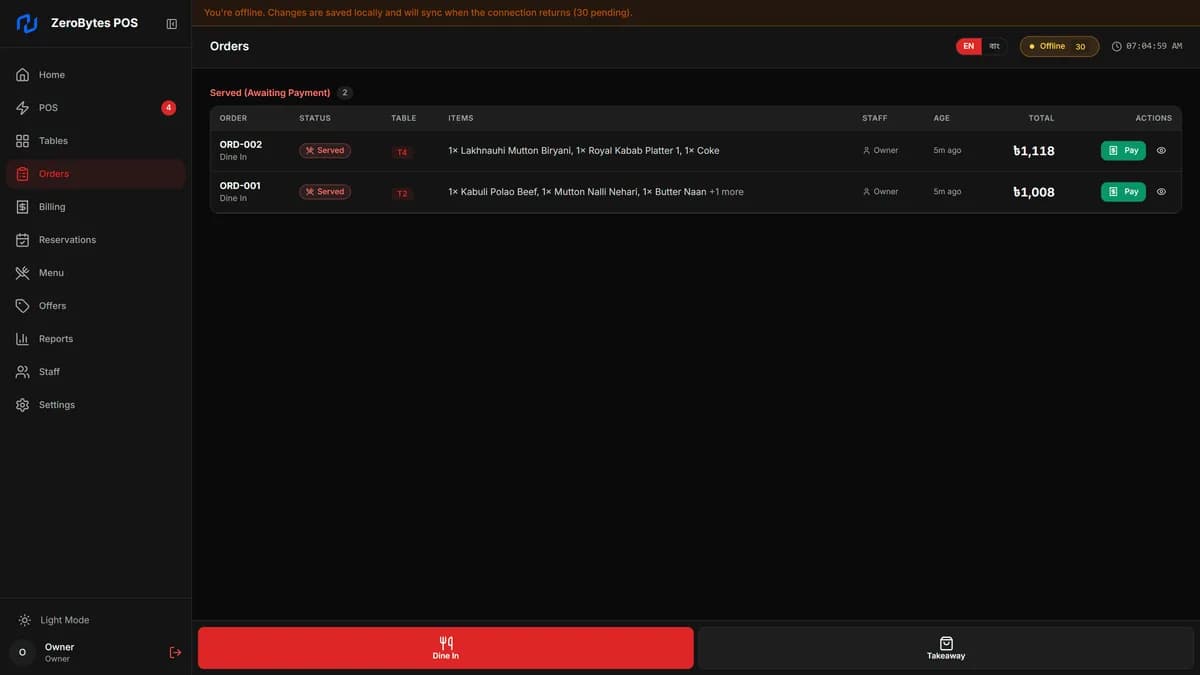
None of the above is visible while it is working, which is the point. What the cashier sees is a pill in the corner of the screen that says Offline, and a number beside it counting how many changes are waiting.
That number is the honest version of the claim. It is not a spinner and it is not a reassuring green tick, it is a count of exactly how much work the till is holding on the machine, and it goes down as the queue drains. When something genuinely cannot be sent, it lands in a dead letter count next to it rather than disappearing.
A restaurant does not need to understand any of this. It needs the till to keep taking orders when the line goes down, and it needs the day's figures to be right afterwards. Everything above exists so that those two things are the same sentence.
This is how ZeroBytes POS works.
ZeroBytes POS is our own point of sale for restaurants, and it is for sale. See what it does, or ask us about software built the same way for your business.