
In this guide
Most software that claims to support a second language has a file of translated strings and a switch in the settings. Flip it and the buttons change. That is localisation as a feature, bolted to a product that was designed in English and will always think in English.
It is usually enough for a website. It is not enough for a till that a cashier uses eight hours a day.
The numerals give it away
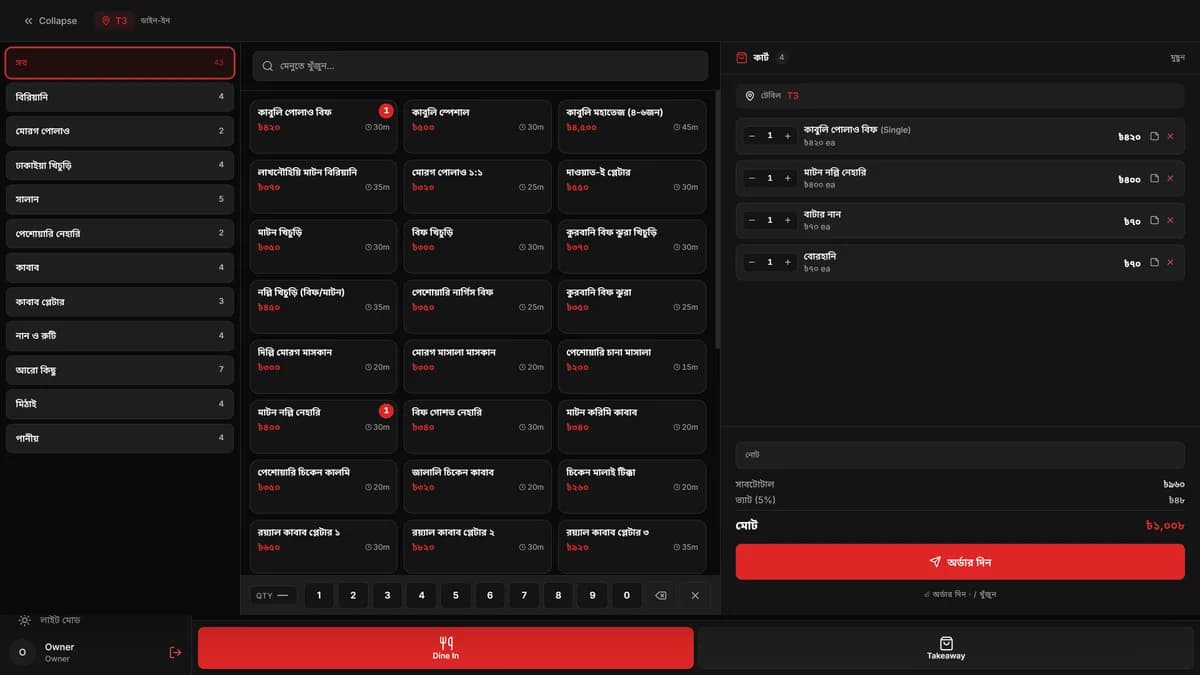
Here is the fastest way to tell the two apart. Set the interface to Bangla and look at a price.
If it says ৳1,008, the app translated its labels and left its numbers alone. If it says ৳১,০০৮, somebody thought about who is reading it.
Bengali numerals are not decoration. They are what the numbers on a printed menu in Dhaka look like, what a customer sees on a hand written bill, and what a cashier who did their schooling in Bangla reads faster than the Western forms. Getting this wrong is not offensive; it is just slower, several hundred times a day, in the one place on the screen where being slow costs money.
Formatting numbers by locale rather than by string substitution is a couple of lines of work. It is skipped because the person building the feature reads Western numerals fine and never notices.
Two names, not one translated name
The other half of the problem is data, and no string file will solve it.
A menu item is not a label to be translated. Kabuli Polao Beef and কাবুলি পোলাও বিফ are both the dish's name, one is not a rendering of the other, and neither is a fallback. The same is true of a section of the floor, a staff member, a category.
So those things carry two name fields, and every screen reads whichever the current language calls for. A restaurant that only wants English fills in one and the interface stops offering the other. A restaurant that wants both gets both, everywhere the name appears, including on the paper that comes out of the kitchen printer.
The alternative, one name field and an automatic translation, produces a menu that is wrong in a way the kitchen will notice before the customer does.
Who is actually reading the screen
The reason to take any of this seriously is that the two languages are not two audiences. They are the same restaurant, at different moments.
The owner reviewing the day's takings may prefer English. The cashier ringing up a table at the counter may not. The manager who covers a shift when someone is sick has their own preference, and their shift starts in ten minutes. The switch is in the header of every screen rather than buried in settings for exactly that reason: it is not a configuration step, it is something a person does when they sit down.
Which means the second language cannot be a degraded mode. Every screen, every dialog, every error, every button, or the switch becomes a trap that drops you into half translated software and you learn not to touch it.
What it costs
Less than people expect, if it is decided early.
Ours is a flat dictionary of about three hundred entries, a t() function of
roughly thirty lines, and a rule that data driven names go through a helper that
picks the right field. No translation library, no async loading, no build step.
The whole thing fits in a file a new developer reads in five minutes.
What is expensive is retrofitting it. Adding a second language to an interface that assumed one means touching every screen, every date, every number and every piece of seed data, and finding, halfway through, that the database has one name column where it needs two.
Decide at the start and it is a small tax on every string you write. Decide later and it is a rewrite with a deadline attached.
Need an interface in Bangla and English?
ZeroBytes POS switches every label and numeral between the two. We build bilingual websites and software the same way.